Dear Friend,
Thank you for purchasing How To Be A FUN Wedding MC. I’m sure you’ll find it very helpful in your Wedding MC Duties.
Please use the form below to contact me for assistance downloading How To Be A FUN Wedding MC if my Help Section doesn’t solve your issue.
If you ordered The Bride’s Guide To A FUN Reception please click the following link
Customer service hours are Monday to Friday 9 am to 5 pm Pacific Standard Time, North America.
If you do not wish to use the Message form below, you can contact us directly at:
support [ at ] weddingmc.org
Note: In the above email address [ replace [ at ] with @ ] There are NO spaces in the email address.
Please direct any questions you may have by email since I only provide email support.
I strive to answer messages and emails within 1 business day.
If you don’t hear from me within 1 business day after contacting me then your message or email may have been delayed or lost and I suggest you send your message or email to me again.
After Your Purchase Has Taken Place
>> You will receive an email from ClickBank Customer Service with purchase details on it, including your receipt (order) number, as well as a download link to How To Be A FUN Wedding MC and the FREE Bonuses.
>> ClickBank processes your payment. Therefore, your payment for How To Be A FUN Wedding MC will show on your credit card, PayPal, or bank statement as “CLICKBANK” or “CLKBANK*COM
>> For faster service when contacting me please indicate in the Message section below (1) your Clickbank Receipt/Order Number, (2) the Email You Used To Make The Purchase, and (3) the Date of Your Purchase, (4) the Name of the Product you purchased. (Please do NOT send any credit card information.)
Before Contacting Me Please Try This HELP Section First:
How Do I Get Access To How To Be A FUN Wedding MC and the FREE Bonuses?
1. You will receive an email from Clickbank, the secure payment processor, confirming your order.
2. The email you receive from Clickbank confirming your order will have a green rectangular button that says, “Download or Access Digital Product.” (See image below)
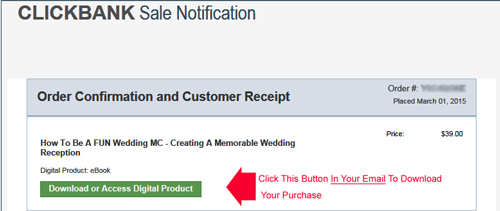
Click on the green button in your email and you’ll be taken to the download page for How To Be A FUN Wedding MC and the FREE Bonuses.
******************
If You Get A Separate Email For The Secure Download Area And You Are Unable To Log In To The Secure Download Area To Access The Product And Bonuses:
Occasionally, some clients have trouble logging in to the secure download area.
If this happens to you, I apologize in advance and I’m happy to help you so you can get started planning the reception as soon as possible.
1. Please enable (that is, allow) COOKIES in your browser so you can log in to the secure download area to download How To Be A FUN Wedding MC.
>> In Firefox go to Tools>Options>Privacy>and tick/check “Accept Cookies From Sites” to enable cookies.
>> In Internet Explorer go to Tools>Internet Options>Privacy>Settings>Advanced to enable cookies. (Override automatic cookie handling should be checked. Accept First-party cookies. Always allow session cookies should be checked.)
If you are unsure how to enable cookies check your browser’s Help section in the tabs section at the upper left corner of your browser (shows as a ? in upper left hand corner of Internet Explorer browser).
1b. After enabling cookies, if you still can’t log in to the secure download area, close your browser and then reopen it to clear its cache.
1c. Please ensure you have input the correct information for the LOGIN ID and Password. (See number 2 and 3 below)
Note: Sometimes it takes a few minutes for your purchase information to be received. You will not be able to log in to the secure download area until your purchase information has been recorded in our files.
If you are unable to log in, please try to log in to the secure download area after waiting about 30 minutes. Please ensure COOKIES are enabled before trying to log in again (see 1 above for how to enable cookies).
1d. If your email contains an alternate download URL, click on that URL to go to the special download page. The alternate download URL is only available for five days from the date of purchase.
2. To download How To Be A FUN Wedding MC you will need the email you used during the purchase (that is your LOGIN ID in the secure download area).
3. The password is the CLICKBANK RECEIPT or ORDER number (called the invoice number in the secure download area) that displays after you have completed the purchase. This information is also sent to your email address by ClickBank Customer Service.
If you are unable to log in after trying the above, please contact me using the form below or email me at support [at] weddingmc.org (replace [at] with @). There are NO spaces in the email address.
I’ll definitely look after you and send How To Be A FUN Wedding MC and the Bonuses to your email.
Can’t Read How To Be A FUN Wedding MC
1. How To Be A FUN Wedding MC is a PDF (Adobe Acrobat) file. If you don’t have Adobe Acrobat you can download a FREE version for your PC, here
2. If you don’t have Acrobat Reader for your Macintosh computer you can get it at the following link (copy and paste into your browser address bar):
http://www.adobe.com/support/downloads/product.jsp?platform=macintosh&product=10
**Be sure to check your computer’s system requirements before downloading the Adobe Acrobat Reader Software for Macintosh or for your PC**
How To SAVE How To Be A FUN Wedding MC
1. To SAVE How To Be A FUN Wedding MCto your (PC) computer:
>> Right click the download link in the secure download area and select “Save Target As…” (Internet Explorer browser) or “Save Page As…” (Firefox browser). Then select a location on your computer to save the file to. The file is a PDF file.
>> Alternatively, if you double-click on the download link in the secure download area, the file will download and open automatically as a PDF file on your computer if you have Adobe Acrobat Reader.
>> Once the PDF file is open, you can SAVE it to your computer by selecting “File” then “Save a Copy” using Adobe Acrobat Reader.
.ZIP File Format: What To Do
1. Please note that if the file for How To Be A FUN Wedding MC or any bonus is in a zip file format (the filename will end with .zip), you will require a zip utility program to extract (unzip) the files.
>> You can download and install a FREE zip utility program that will unzip the file at www.7-zip.org
>> The file can also be unzipped using WinZip. You can get a trial version of WinZip at http://www.winzip.com or at http://www.winzip.com/win/en/downwz.htm
Payment Information and Questions About Your Order
1. Your payment for How To Be A FUN Wedding MC will show on your credit card, PayPal, or bank statement as “CLICKBANK” or “CLKBANK*COM
2. Please go to https://www.clickbank.com/clkbank.htm for assistance if you have any questions regarding your order. (ClickBank’s Live Chat is also on that page and is available during ClickBank’s business hours to answer your questions.)
You can also contact us using the form below or email us at support [ at ] weddingmc.org.
Alternatively, click on the appropriate link in the CUSTOMER SERVICE section of your ClickBank receipt email that was sent to you when you ordered. (Please provide your ClickBank Order Number and the date of your order for faster service.)
Thank You and Best Wishes With Your Wedding MC Duties!
Mark
P.S. Unable to find the download link to How To Be A FUN Wedding MC and the FREE Bonuses? See “How Do I Get Access To How To Be A FUN Wedding MC and the FREE Bonuses?” above in the Help Section for instructions so you can access your purchase immediately.
Special note for spammers and solicitors of products or services: This page is for customers only. Please note that a solicitation of services or products and bogus praise about this site to promote your product will be treated as SPAM and BLACKLISTED (as well as ignored).
mark at weddingmc.org [substitute @ for at]
Special note for spammers and solicitors of products or services: This page is for customers only. Please note that a solicitation of services or products and bogus praise about this site to promote your product will be treated as SPAM and BLACKLISTED (as well as ignored).


